
Tooling & Productivity
KeyPress
20 January 2026
KeyPress helps GSIB / COMET users store and retrieve passwords and Secret Keys in one secure place — so you don't have to hunt for the right key each time.
Opportunity— What problem are you working on, and why does it matter?
Problem statement
KeyPress is a simple tool for government officers to store, retrieve, and share passwords and secret keys (e.g. FormSG Secret Keys) so teams can access government products smoothly, without hunting through email threads or copying secrets into unsafe places.
It is especially relevant for officers on GSIB/COMET (and other constrained environments) who may not have access to commercial password managers.
Why it matters
Lost productivity — Officers juggle multiple passwords across different systems, each with different rules and rotation schedules. These non-technical staff face constant lockouts after 3-5 wrong attempts, leading to frequent IT calls.
Security-risks — From our research, teams often resort to risky workarounds. Officers reuse password patterns (2026NewPassword001 → 2025NewPassword002), forward secret keys to colleagues by email, or pin messages in Microsoft Teams.
Expensive alternatives — Why not just buy a commercial solution like 1Password? We estimate the cost to be $14.8M a year for 154,000 public officers.
Controlled environments — Adoption of commercial solutions is difficult for users on GSIBs, COMET, SEED and systems with restricted access to external networks.
Scale
154,000 public officers
6.91M+ secret keys created, created by 56,158 FormSG current users
Estimated savings of $14.8M a year
Velocity — What you actually built or changed in the last month
What we built
Features:
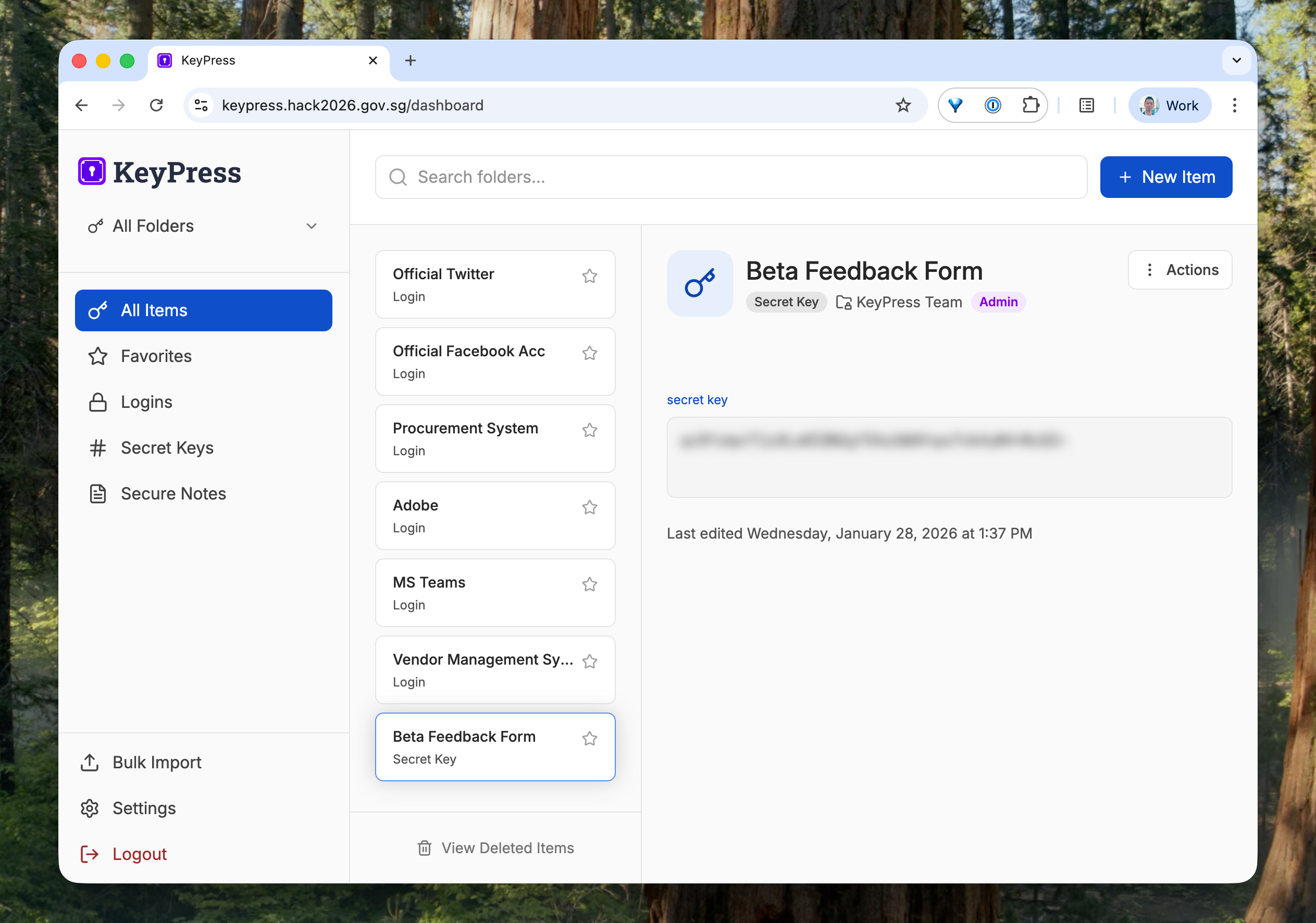
Sign in with their gov.sg email
Store passwords, FormSG secret keys, and secure notes securely
Shared team folders (a folder is similar to a “Vault” in 1Password, renamed for non-technical users)
Create single-use password links for secure sharing
Additional:
Simple access control: View, Edit, Admin
Account recovery options, designed for Restricted data handling
Bulk import & export
Moving items between folders
Backlog
Given more time, we'd love to work on:
Better folder management (able to rename, delete)
Mobile optimisation
Integration with more government systems beyond FormSG
Easier onboarding flow
Traction — How real people are using it, and what is happening as a result?
Usage
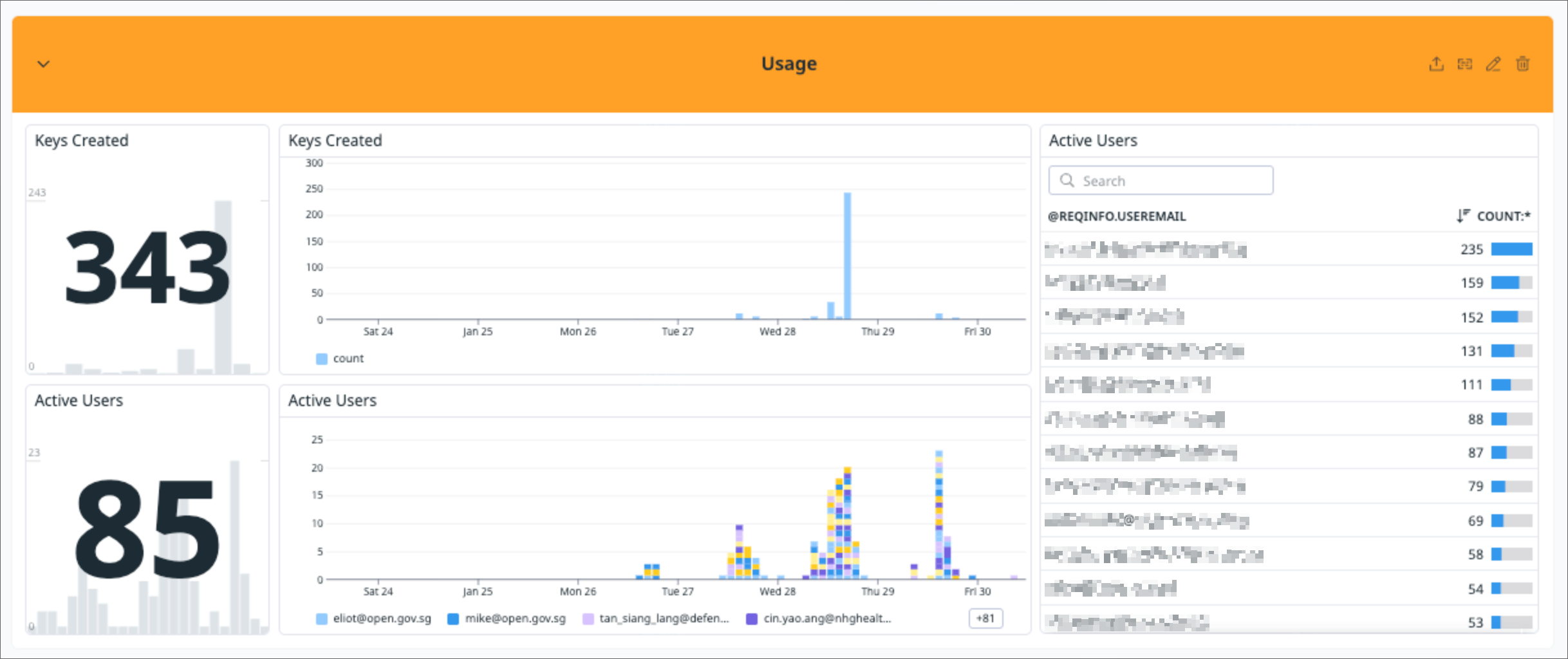
We launched the KeyPress beta on Jan 26. Within 5 days, we recorded:
85 user sign-ups, with 47 users uploading at least 1 key
Users from 13 government agencies: Schools, MINDEF, NHG, CPF, etc.
345 secrets successfully stored
3 shared secrets
Most of the users were recruited from an email blast to the FormSG user group.
Impact
Our Beta Test, support calls and user research show both the scale of the problem and user readiness to adopt our solution. Some signals observed:
Real demand — One user from MINDEF manages 8 different vendor projects and generates 32 new FormSG secret keys monthly. Bulk imported their existing 27 keys during onboarding.
Another internal user imported 100+ secret keys at one go, enabling them to work on different laptops.
Early testing shows that officers can quickly understand and use KeyPress without extensive training, addressing our goal of low mental load for non-technical users.
I've tested KeyPress, and it looks good to me. The functions are very straightforward, and the option to share passwords with team members is especially helpful. Some of our ordering platforms are department-based, so having a shared password that can be updated centrally without informing everyone individually is very convenient.— Beta Tester in healthcare space
Team

Try out KeyPress here: https://keypress.hack2026.gov.sg/